
|
|
| Print Method(Vessel schedule) |
| @ [1] Selection of Terminal | @ [2] Vessel schedule 'Open in New Window' |
| @ [3] Print Vessel schedule |
| ¨Back to menu |
| [1] Selection of Terminal | |
|
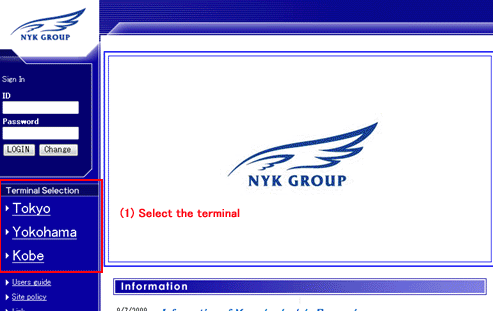
(1) Please select the terminal. The menu is displayed. |
| ’Top of this menu | |
| [2] Vessel schedule 'Open in New Window' | |
|
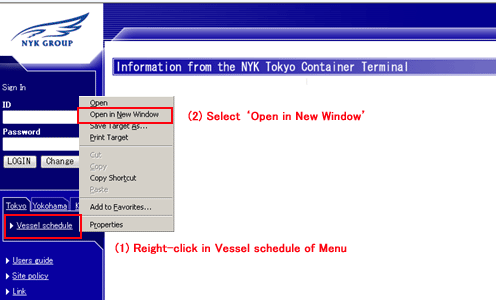
(1) Please right-click in Vessel schedule of Menu (2) Please select 'Open in New Window' Menu is not displayed, and only 'Vessel schedule' is displayed. |
| ’Top of this menu | |
| [3] Print Vessel schedule | |
|
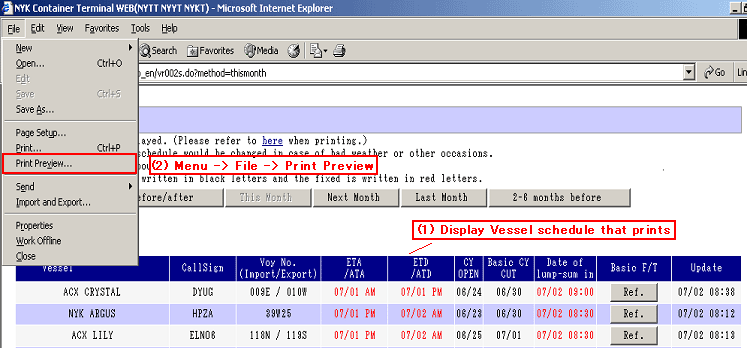
(1) Please display Vessel schedule that prints. (Please refer to here when data searching.j (2) Please press Menu -> File -> Print Preview, and display Print Preview. |
|
|
|
|
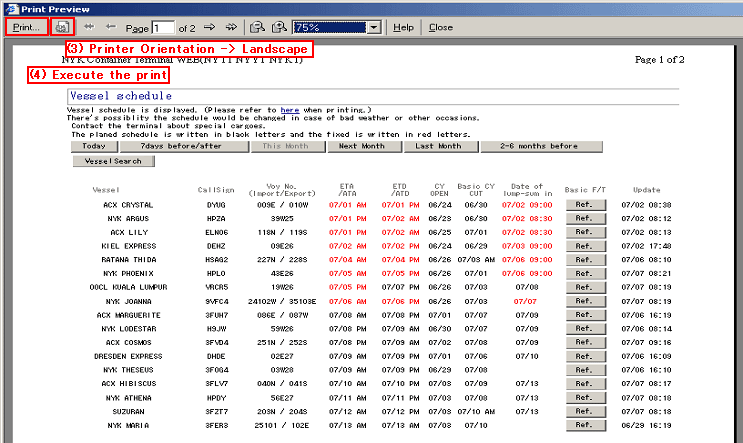
(3) Printer Orientation -> Landscape (4) Please execute the print after confirming the print layout. *The figure below is a print preview of ie6. |
|
|
|
| ’Top of this menu | |